Accounts payable sits at the intersection of cash management, vendor relationships, and financial control. Every supplier invoice represents a commitment to pay—and a chain of steps that must happen correctly before funds leave the business. In most organisations, that chain still involves manual work: opening email attachments, typing invoice details into an ERP, chasing approvers, matching documents by hand, and hoping duplicate payments do not slip through.
Invoice processing automation changes that equation. By combining invoice OCR, workflow engines, matching logic, and ERP integrations, modern AP teams achieve touchless processing for the majority of invoices while reserving human attention for genuine exceptions. The result is faster cycle times, lower cost per invoice, stronger audit trails, and AP staff focused on analysis rather than data entry.
This guide walks through the complete AP workflow in 2026—from pain points and capture through extraction, matching, approval, posting, and measurement. Whether you are a finance leader building a business case, an AP manager optimising daily operations, or an accountant evaluating tools for clients, you will find actionable frameworks, implementation checklists, and answers to the questions teams ask most often about accounts payable automation.
For foundational context on the technology layer, see our companion guide on what is intelligent document processing—invoice automation is one of the highest-impact applications of IDP in finance.
Key Takeaways
- Manual AP workflows create bottlenecks, errors, duplicate payments, and slow month-end close—automation addresses each failure mode systematically.
- Invoice OCR and AI extraction convert PDF invoices into structured data; accuracy and layout handling determine touchless rates.
- Three-way matching validates invoices against purchase orders and goods receipts before payment—critical for spend control.
- Approval workflows must reflect organisational hierarchy, segregation of duties, and amount thresholds without becoming approval black holes.
- Touchless AP targets 80–95% straight-through processing; exceptions route to human reviewers with full document context.
- Successful implementation requires process design, integration testing, change management, and continuous metric monitoring—not just software purchase.
Table of Contents
- Why Accounts Payable Needs Automation in 2026
- The Standard AP Workflow: Manual vs Automated
- Invoice Capture: Where Automation Begins
- Invoice OCR and AI Data Extraction
- Three-Way Matching Explained
- Approval Workflows and Segregation of Duties
- ERP Posting and Payment Execution
- Touchless Invoice Processing
- The BillsDeck AP and Document Workflow
- AP Automation Metrics That Matter
- Invoice Processing Automation Implementation Checklist
- Choosing AP Automation Software
- Frequently Asked Questions
- Final Thoughts
Why Accounts Payable Needs Automation in 2026
Before diving into workflow mechanics, it helps to name the pain points AP teams live with daily. These problems are not anecdotal—they appear consistently across industries and company sizes, and they compound as transaction volume grows.
Volume and Velocity Pressure
Mid-market organisations often process 500–5,000 invoices monthly. Each invoice traditionally requires opening a file, verifying legitimacy, entering data, obtaining approval, and scheduling payment. At 8–12 minutes per invoice manually, a 1,000-invoice month consumes 130–200 hours—roughly one full-time employee doing nothing but typing and routing.
Volume spikes during year-end, project milestones, and seasonal procurement overwhelm manual teams. Backlogs delay payments, strain vendor relationships, and forfeit early-payment discount opportunities.
Data Entry Errors and Rework
Manual keying produces error rates of 1–4% depending on complexity and fatigue. A transposed digit on an invoice total, a wrong vendor code, or a mis-keyed tax amount creates downstream problems: incorrect accruals, payment disputes, time-consuming reversals, and audit findings.
Correction cycles are expensive because they interrupt approvers, require ERP adjustments, and sometimes trigger duplicate payment investigations.
Duplicate and Fraud Risk
Without systematic duplicate detection, the same invoice may be paid twice—especially when vendors resend documents or when email threads contain multiple copies. Fraudulent invoices slip through when AP lacks time to validate bank detail changes or unfamiliar suppliers.
Automation applies duplicate rules (vendor + invoice number + amount + date windows) and flags vendor master data changes before payment release.
Slow Approvals and Invisible Bottlenecks
Invoices sit in approvers' inboxes because routing is manual, approvers lack context, or escalation rules do not exist. AP teams spend disproportionate time chasing signatures rather than resolving exceptions.
Automated workflows route by amount, department, cost centre, and project—with reminders, delegations, and mobile approval options.
Weak Audit Trails
Paper folders, scattered email attachments, and spreadsheet trackers fail audit standards. Regulators and auditors expect immutable records linking source documents, extracted data, approvers, timestamps, and ERP postings.
AP automation centralises document storage with full lineage from receipt to payment.
Talent and Cost Pressures
Skilled AP professionals leave repetitive roles when automation is absent elsewhere in the organisation. Hiring replacements is difficult; training takes months. Automation elevates AP from transactional processing to exception management, vendor analytics, and cash optimisation—making roles more strategic and retentive.
These pain points collectively drive demand for invoice processing automation and broader accounts payable and procurement modernisation initiatives.
The Standard AP Workflow: Manual vs Automated
Understanding the end-to-end AP cycle clarifies where automation inserts value. The standard workflow includes seven stages.
Stage 1: Invoice Receipt
Manual: Invoices arrive via email, mail, or supplier portal. AP staff download attachments, rename files inconsistently, and save to shared drives or local folders.
Automated: Dedicated AP inboxes (e.g., invoices@company.com) ingest attachments automatically. Portals and EDI feed the same queue. Documents receive unique IDs and timestamps at receipt.
Stage 2: Validation and Registration
Manual: Clerk verifies the invoice is addressed to the correct entity, checks for obvious duplicates, and logs receipt in a spreadsheet or ERP module.
Automated: System validates sender, checks duplicate hash, confirms mandatory fields exist, and registers the invoice in workflow with status tracking.
Stage 3: Data Capture
Manual: Clerk types vendor, invoice number, date, line items, tax, and total into ERP or intermediate spreadsheet.
Automated: Invoice OCR and AI extraction populate fields with confidence scores. Low-confidence fields queue for review.
Stage 4: Matching and Coding
Manual: Clerk compares invoice to PO and receipt manually, assigns GL codes from memory or lookup tables, and emails procurement about discrepancies.
Automated: Two-way or three-way matching runs automatically. GL and cost centre coding applies rules based on vendor, commodity, or project defaults.
Stage 5: Approval
Manual: Email forwarded to manager with PDF attached. Approver replies "OK" with no structured record.
Automated: Workflow routes to correct approver(s) by hierarchy and amount. Mobile and web approval with audit log. Escalation if SLA breached.
Stage 6: ERP Posting
Manual: Clerk re-enters approved data into ERP or exports CSV for import—risking second-round errors.
Automated: Approved invoices post via API or connector with idempotent retries and error alerting.
Stage 7: Payment and Archival
Manual: Payment batch prepared separately; document filing inconsistent.
Automated: Approved payables feed payment runs (ACH, wire, cheque). Source PDFs linked to ERP records permanently.
The automated workflow eliminates re-keying between stages—the extracted data object flows from capture through approval to posting unchanged unless a human corrects it.
Invoice Capture: Where Automation Begins
Automation quality depends on capture quality. Garbage in, garbage out applies forcefully to AP.
Email Ingestion
The most common invoice channel is email. Best practices:
- Publish a single AP address to suppliers; avoid personal inboxes
- Configure rules to reject executables and accept PDF, PNG, TIFF, XML (e-invoice)
- Strip signatures and unrelated thread content where possible
- Acknowledge receipt automatically to reduce supplier follow-up calls
Supplier Portals and E-Invoicing
Large suppliers push invoices through portals or Peppol/e-invoice networks. These channels deliver structured data alongside PDFs—ideal for touchless processing. AP automation platforms should ingest portal exports and XML without treating them as unscanned images.
Scanning and Mailroom
Paper invoices still exist. High-speed scanners with batch profiles feed IDP platforms directly. Mailroom services can pre-sort and scan before digital ingestion.
API and SFTP Intake
Enterprise integrations receive invoice files from procurement systems, shared service centres, or OCR bureaus via API or scheduled SFTP drops.
Capture Quality Checklist
Before extraction, validate:
- Minimum 300 DPI for scans
- Full page captured without cropping
- Readable text (not password-protected without credentials)
- Correct entity (multi-company environments)
Rejecting unreadable documents at capture saves exception queue capacity downstream.
Invoice OCR and AI Data Extraction
Invoice OCR is the technology layer that converts invoice images and PDFs into machine-readable text and structured fields. In 2026, leading solutions combine OCR with layout analysis, machine learning, and large language models to handle diverse supplier formats without maintaining hundreds of templates.
What Invoice OCR Extracts
Typical header fields:
- Vendor name and address
- Vendor tax ID / VAT number
- Invoice number and date
- Due date and payment terms
- Purchase order reference
- Currency
- Subtotal, tax, and total amounts
- Bank details (for validation against vendor master)
Line-item fields:
- Description
- Quantity and unit of measure
- Unit price
- Line extension
- Tax per line (where applicable)
Accurate line-item extraction enables granular GL coding, project allocation, and three-way matching at line level—not just header totals.
OCR vs AI Extraction
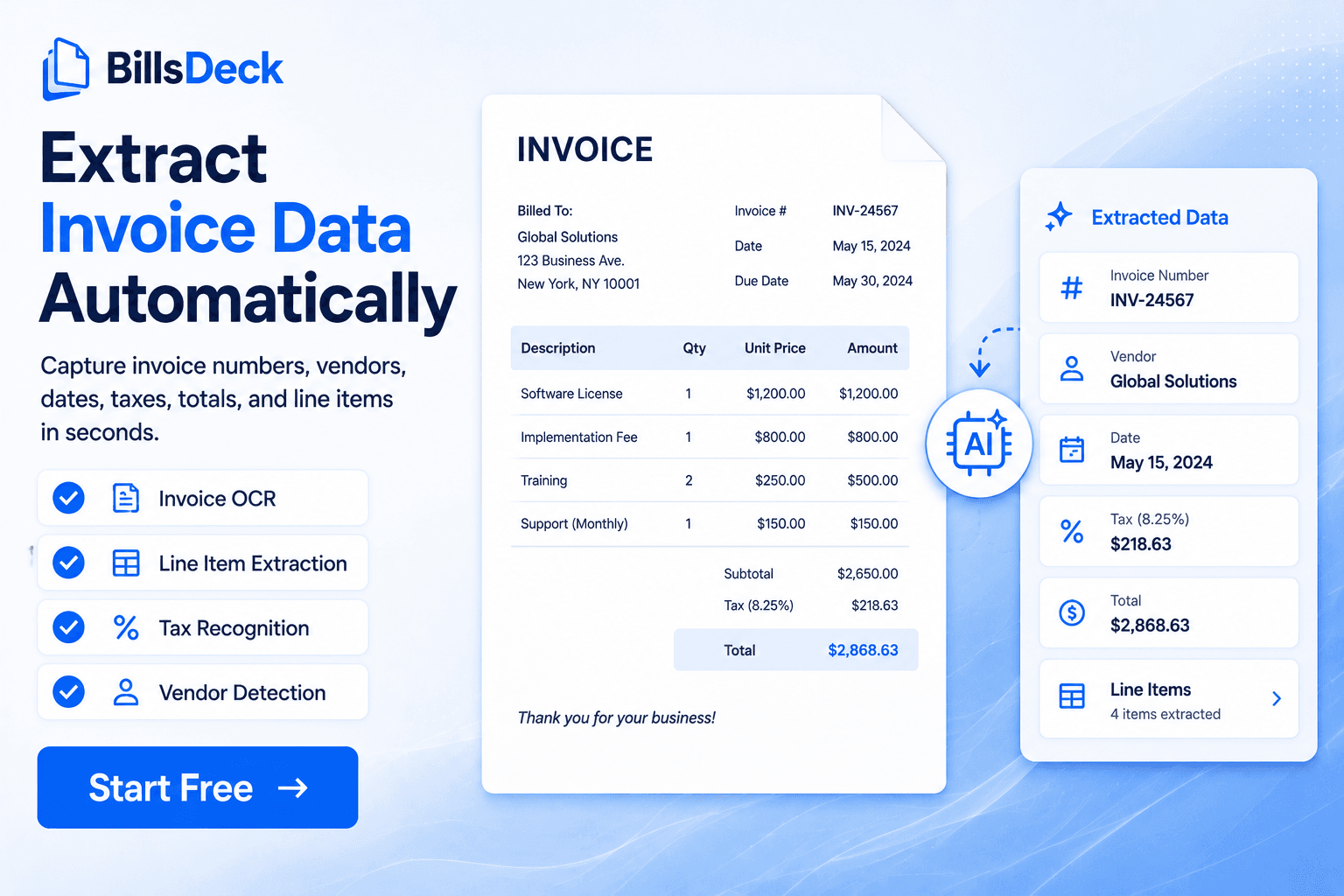
Basic OCR returns a text block. AI extraction maps text to semantic fields—even when labels vary ("Inv No," "Invoice #," "Document Number"). It interprets tables spanning multiple pages and distinguishes shipping charges from line items.
Teams evaluating extraction should test with their actual supplier PDFs, including poor scans and non-English invoices if applicable. Marketing accuracy claims rarely reflect your document mix.
Structured Output Formats
Extracted invoices typically export as JSON, XML, or direct ERP records. Tools like invoice-to-JSON illustrate the target structure: normalised fields ready for matching and posting without manual transformation.
Confidence Scores and Exception Routing
Each extracted field carries a confidence score. Thresholds determine straight-through processing vs human review. For example:
- Header totals below 95% confidence → mandatory review
- Vendor name fuzzy match to master data → suggest matches, require confirmation
- Missing PO on PO-required vendors → route to procurement queue
Tuning thresholds balances touchless rate against error risk. Start conservative; loosen as accuracy proves stable.
Continuous Learning
When reviewers correct extractions, systems should learn—mapping supplier-specific layouts, alias vendor names, and improving field locators. Without feedback loops, accuracy plateaus.
For deeper technical context on document AI beyond invoices, see what is intelligent document processing.
Three-Way Matching Explained
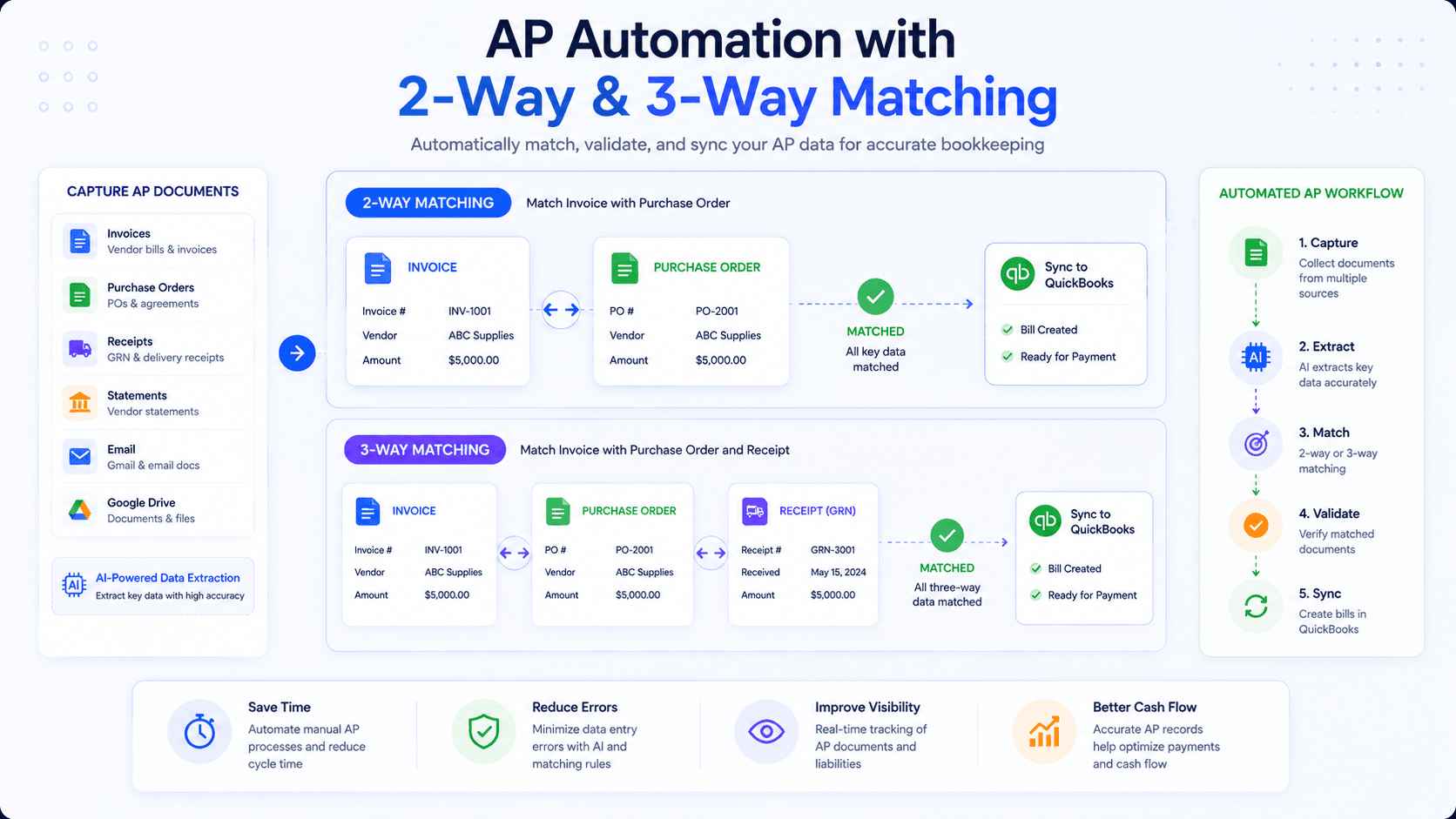
Three-way matching compares invoice data against the purchase order (PO) and goods receipt (GRN) before approving payment. It is the primary control preventing payment for unauthorised purchases, wrong quantities, or inflated prices.
The Three Documents
- Purchase order — What the organisation agreed to buy, at what price, from which vendor
- Goods receipt / service entry — What was actually received or performed
- Supplier invoice — What the vendor claims is owed
Matching verifies all three align within defined tolerances.
Two-Way vs Three-Way Matching
Two-way matching compares invoice to PO only—common for services or when goods receipt is implicit. Faster but weaker control.
Three-way matching adds goods receipt—essential for inventory, manufacturing, and organisations with strict procurement policies.
Configure matching strictness by category: office supplies might allow quantity variance of 5%; capital equipment might require exact match.
Tolerance Rules
Real-world discrepancies occur—partial shipments, rounding, tax calculation differences. Tolerance rules define acceptable variance:
- Price variance: ±2% or ±£50, whichever is lower
- Quantity variance: ±1 unit or ±5%
- Tax variance: ±£0.05 rounding
Within tolerance: auto-approve (if other rules satisfied). Outside tolerance: exception to buyer or AP supervisor.
Exception Types
Common matching exceptions:
- Invoice exceeds PO amount
- Quantity billed exceeds quantity received
- PO number missing or invalid
- Wrong vendor on invoice vs PO
- Currency mismatch
- Duplicate invoice detected
Each exception type should have a defined owner and SLA. Procurement resolves PO issues; AP resolves duplicate questions; requestors confirm receipt.
Matching Without POs
Not all spend is PO-backed—utilities, subscriptions, and low-value purchases may use non-PO invoices. Automation routes these through alternate approval paths with coding rules and budget checks instead of PO matching.
Approval Workflows and Segregation of Duties
Extraction and matching produce clean data—but payment still requires human authorisation aligned with internal controls.
Designing Approval Hierarchies
Approval rules typically combine:
- Amount thresholds — Manager approval under £5,000; director above
- Department / cost centre — Route to budget owner
- Vendor category — Capital spend requires CFO
- Project code — Project manager approval for job-related invoices
Rules should be documented, testable, and configurable without code changes where possible.
Segregation of Duties (SoD)
SoD prevents fraud by separating incompatible roles:
- Person who creates vendor ≠ person who approves payment
- Person who receives goods ≠ person who approves invoice (in ideal control environments)
Workflow engines enforce SoD by blocking approvals when conflicts exist and requiring alternate approvers.
Mobile and Delegated Approval
Approvers delay workflows when travelling or overloaded. Mobile approval apps, out-of-office delegations, and escalation after 48 hours keep invoices moving.
Approval UX Matters
Approvers are often executives with minimal patience for AP software. Effective approval screens show:
- Original invoice PDF
- Extracted key fields highlighted
- PO and receipt summary side-by-side
- One-click approve, reject, or request info
- Comment field captured in audit log
Poor UX drives email-based "just approve it" workarounds that bypass controls.
ERP Posting and Payment Execution
Automation value culminates when approved invoices become ERP payables records without re-keying.
Integration Patterns
Common integration approaches:
- Native connectors — Pre-built links to NetSuite, SAP, Microsoft Dynamics, Xero, QuickBooks, Sage
- API posting — Custom integration via REST/SOAP for proprietary ERPs
- File-based import — CSV/XML drops where APIs unavailable (higher latency, more failure modes)
Prefer real-time API posting with error handling over nightly batch files when volume supports it.
Field Mapping
Map extracted fields to ERP schema:
- Vendor ID (from master data match)
- Invoice number, date, due date
- Line items → expense accounts or item receipts
- Tax codes
- Dimensions: department, location, project, class
Document mapping in a specification reviewed by AP and IT. Version mapping when ERP upgrades occur.
Idempotency and Error Handling
Network retries must not create duplicate ERP records. Use idempotency keys (vendor + invoice number + entity) and check-before-create logic.
Failed posts should alert AP with actionable error messages—not generic "integration error." Common fixes: inactive vendor, closed accounting period, missing tax code.
Payment Runs
After posting, approved payables enter payment batches—ACH, wire, virtual card, or cheque. Payment automation (often separate from invoice automation) selects invoices by due date, discount deadline, and cash position.
Link payment confirmation back to source invoice for complete audit trail.
Touchless Invoice Processing
Touchless invoice processing means invoices flow from receipt to ERP posting without manual data entry or routing intervention. Humans may still approve high-value items, but they are not typing vendor names or forwarding emails.
Touchless Rate Benchmarks
| Maturity Level | Typical Touchless Rate | Characteristics |
|---|---|---|
| Manual | 0% | All keying and routing manual |
| Basic automation | 30–50% | OCR with heavy exception load |
| Mature automation | 70–85% | Strong matching, clean supplier PDFs |
| Best-in-class | 85–95% | E-invoicing, PO discipline, tuned AI |
Touchless rate = (invoices posted without manual touch) / (total invoices) × 100. Define "manual touch" consistently—approval clicks usually do not count as manual if your goal is eliminating data entry.
Enablers of High Touchless Rates
- Supplier enablement: request searchable PDFs and PO references on every invoice
- PO compliance: no PO, no pay policies for applicable categories
- Clean vendor master data
- E-invoice adoption where available
- Tuned confidence thresholds after 90 days of production data
- Regular exception analysis to fix root causes—not just symptoms
When Touchless Is Wrong Goal
Some invoices always need human judgment—contract disputes, complex credit notes, legal settlements. Optimise for minimum necessary touch, not zero human involvement at all costs.
The BillsDeck AP and Document Workflow
BillsDeck approaches invoice and document automation from an accounting-first perspective—designed for finance teams, bookkeepers, and firms managing multiple clients rather than generic enterprise AP suites requiring lengthy SI projects.
Central Document Inbox
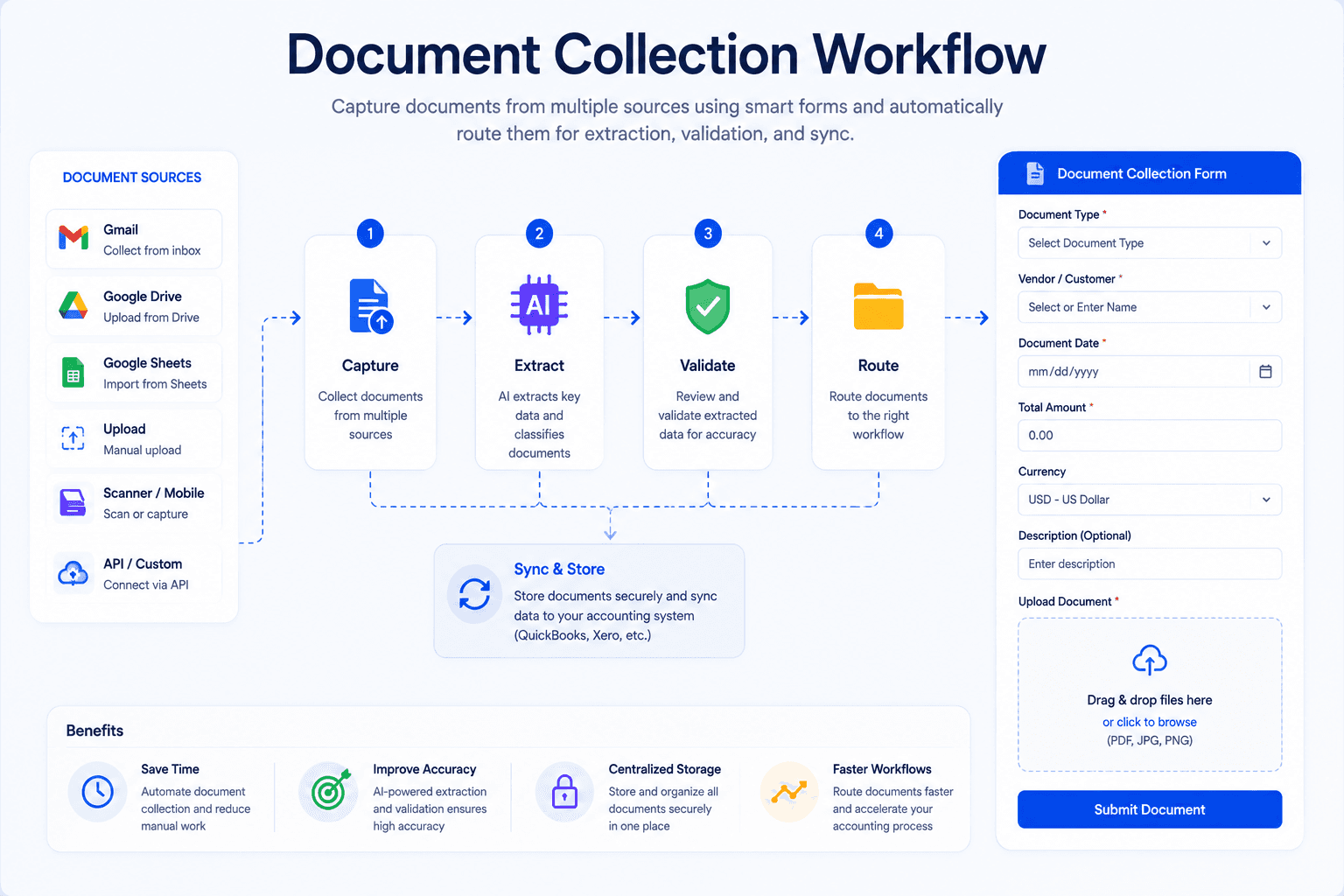
Invoices, receipts, and statements arrive in a unified inbox via upload, email forward, or integration. AI classifies and routes each document to the appropriate processing pipeline—eliminating pre-sort manual work.
Invoice OCR and Extraction
BillsDeck's invoice OCR extracts vendor, dates, amounts, tax, and line items from varied PDF layouts. Reviewers see source documents alongside extracted fields, correcting low-confidence values in seconds.
For teams needing raw structured output, the invoice-to-JSON tool demonstrates field normalisation suitable for custom integrations.
Matching, Review, and Approval Support
While full three-way matching depth depends on ERP integration and PO data availability, BillsDeck supports validation workflows—duplicate detection, field completeness checks, and human review queues that keep exceptions organised.
Firms align BillsDeck with client accounts payable and procurement policies, using the platform as the document intelligence layer feeding Xero, QuickBooks, Sage, and other ledgers.
Accounting Integrations
Native integrations push approved, categorised transactions to accounting platforms—closing the gap between extracted invoice data and client books. This is where document automation becomes AP automation in practice.
Scale for Firms and SMBs
Accounting practices processing high client volumes benefit from bulk upload, workspace separation, and repeatable workflows. SMB finance teams gain enterprise-grade extraction without enterprise implementation timelines.
Compare BillsDeck to other invoice AI vendors in our Nanonets alternative guide—evaluating accuracy, accounting fit, pricing, and workflow design.
For the underlying technology narrative, pair this workflow guide with what is intelligent document processing.
AP Automation Metrics That Matter
What gets measured gets improved. Track these KPIs monthly and review trends quarterly.
Operational Metrics
- Touchless processing rate — Percentage requiring no manual data entry
- Cycle time — Days from invoice receipt to ERP posting
- Exception rate — Percentage routed to human review
- Exception resolution time — Hours from queue entry to resolution
- First-pass match rate — Invoices matching PO/GRN without intervention
- Duplicate detection count — Prevented duplicate payments
Quality Metrics
- Extraction accuracy — Field-level correctness vs sample audit
- Posting error rate — ERP rejects or reversals per 1,000 invoices
- Vendor inquiry rate — Payment status contacts from suppliers (often inversely correlated with automation quality)
Financial Metrics
- Cost per invoice — Fully loaded AP cost / invoice volume
- Early payment discount capture — Discounts taken vs offered
- Late payment penalties avoided
- AP headcount per invoice — Normalised productivity
Benchmark Targets (12-Month Horizon)
Organisations implementing AP automation commonly target:
- 50% reduction in cost per invoice
- 40% reduction in cycle time
- 70%+ touchless rate for PO-backed invoices
- Near-zero duplicate payments
- 80% reduction in data entry hours
Adjust targets based on starting maturity and document quality.
Invoice Processing Automation Implementation Checklist
Use this checklist to structure your rollout from discovery through steady-state operations.
Phase 1: Discovery (Weeks 1–2)
- Inventory invoice volume by entity, channel, and document type
- Sample 100 invoices; assess PDF quality and PO coverage
- Document current cycle time, cost per invoice, and error rates
- Map existing approval hierarchy and SoD requirements
- Identify ERP integration constraints and accounting periods
- Define success metrics and 90-day targets
Phase 2: Vendor Selection (Weeks 2–4)
- Shortlist AP automation platforms (evaluate invoice OCR on your samples)
- Run proof-of-concept with real invoices—not demo documents
- Validate accounting/ERP connector depth
- Review security, compliance, and data residency
- Compare TCO: licence, per-document fees, implementation services
- Reference checks with similar-sized organisations
Phase 3: Process Design (Weeks 3–5)
- Design target workflow from capture to payment
- Define matching rules and tolerances by category
- Configure approval matrix with amount thresholds
- Specify exception types, owners, and SLAs
- Plan vendor master data cleanup and PO compliance initiative
- Document field mapping to ERP schema
Phase 4: Build and Integrate (Weeks 4–8)
- Configure AP inbox and ingestion channels
- Tune OCR extraction thresholds on pilot document set
- Connect ERP with test environment posting
- Implement duplicate detection rules
- Build approval workflow with delegations and escalations
- Set up monitoring alerts for integration failures
Phase 5: Pilot (Weeks 8–10)
- Run parallel processing: old vs new workflow on same invoices
- Reconcile discrepancies; tune rules
- Train AP staff and approvers on exception and approval UX
- Limit pilot to one entity or business unit if multi-company
- Weekly review of touchless rate and top exceptions
Phase 6: Rollout (Weeks 10–14)
- Cut over remaining entities and channels
- Communicate new supplier invoice submission guidelines
- Disable manual re-keying paths to prevent shadow processes
- Go-live support with daily standups for two weeks
Phase 7: Optimise (Ongoing)
- Monthly KPI dashboard review
- Quarterly supplier outreach for e-invoicing and PO references
- Continuous threshold tuning based on correction patterns
- Annual re-validation of approval matrix and SoD
- Expand automation to credit notes, statements, and related documents
Choosing AP Automation Software
The AP automation market spans enterprise suites (Coupa, Basware, Tipalti), ERP-native modules, horizontal IDP platforms, and accounting-focused tools like BillsDeck.
Evaluation Criteria
- Extraction accuracy on your invoices — Non-negotiable; test thoroughly
- Matching capabilities — Two-way and three-way with configurable tolerances
- Workflow flexibility — Amount rules, delegations, mobile approval
- ERP/accounting integrations — Depth matters more than count of logo slides
- Exception experience — AP lives here; UX drives adoption
- Implementation time — Weeks vs months affects ROI start date
- Pricing transparency — Per-document fees scale with volume; understand breakpoints
Build vs Buy
Building custom invoice OCR pipelines is rarely economical unless you are a platform vendor. Maintenance of layout diversity, model updates, and integration glue exceeds initial build cost within 18–24 months for most organisations.
Buy specialised software; integrate via API; focus internal IT on ERP and data governance—not training OCR models.
Accounting Firm Considerations
Firms serving multiple clients need workspace isolation, bulk processing, and multi-platform export. Generic AP suites optimised for single-enterprise procurement may fit poorly. Evaluate Nanonets alternatives and accounting-native platforms alongside enterprise options.
Frequently Asked Questions
What is invoice processing automation?
Invoice processing automation uses software to capture supplier invoices, extract data via OCR and AI, match against POs and receipts, route approvals, and post to ERP—minimising manual data entry and speeding payment cycles.
How does invoice OCR work?
Invoice OCR scans PDF or image invoices, recognises text, and uses AI to map text to fields like vendor, invoice number, date, line items, tax, and total. Results feed matching and ERP posting workflows.
What is touchless invoice processing?
Touchless processing means invoices move from receipt to ERP posting without manual typing or manual routing. Approvals may still occur, but data flows automatically between stages.
What is three-way matching in AP?
Three-way matching compares the supplier invoice to the purchase order and goods receipt before payment—ensuring the organisation pays only for authorised, received goods and services at agreed prices.
How long does AP automation implementation take?
Cloud solutions for SMBs can launch in 2–6 weeks. Enterprise deployments with complex ERP integration and global entities may take 3–6 months. Pilot timelines depend on data quality and change management.
What touchless rate should we target?
Mature organisations target 80–95% touchless for standard PO-backed invoices. Initial pilots often achieve 50–70%, improving as supplier quality and rules tune over time.
Does AP automation replace AP staff?
It reallocates AP work from data entry to exception management, vendor relations, and analytics. Headcount may stabilise or reduce through attrition rather than layoffs; many teams redeploy capacity to higher-value tasks.
How do we handle non-PO invoices?
Configure alternate workflows: coding rules, budget holder approval, and duplicate checks without PO matching. Policy should define which spend categories require POs vs allowed non-PO paths.
Is AP automation secure?
Reputable vendors encrypt data, enforce role-based access, maintain audit logs, and hold SOC 2 or equivalent certifications. Validate vendor bank detail change controls specifically—common fraud vector.
How does BillsDeck fit into AP automation?
BillsDeck provides invoice and document OCR, a central inbox, review workflows, and accounting integrations—ideal for SMBs and accounting firms needing production extraction without enterprise AP suite complexity.
Final Thoughts
Invoice processing automation is no longer a luxury reserved for Fortune 500 procurement organisations. Cloud OCR, document AI, and accounting integrations have democratised accounts payable automation for mid-market companies, nonprofits, and accounting firms managing hundreds of client ledgers.
The complete AP workflow—capture, extraction, matching, approval, posting, payment—contains multiple failure points when executed manually. Automation addresses each stage systematically: invoice OCR eliminates keying; matching enforces spend control; workflows accelerate approvals; ERP integration removes second-pass errors; metrics drive continuous improvement.
Success requires more than software. Clean vendor master data, PO discipline, supplier communication, thoughtfully designed exception paths, and executive sponsorship determine whether touchless rates reach 85% or stall at 40%. Use the implementation checklist in this guide to structure discovery, pilot, and rollout deliberately.
Platforms like BillsDeck meet accounting teams where they work—unified document intake, accurate extraction, human review for exceptions, and direct posting to Xero, QuickBooks, and Sage. Pair operational workflow knowledge from this guide with technical depth from what is intelligent document processing to build a complete automation strategy.
If your AP team is still drowning in email attachments and ERP typing, 2026 is the year to change the workflow—not just add headcount. Measure your current cost per invoice and cycle time, run a pilot on invoice-to-JSON extraction quality, and compare vendors using guides like our Nanonets alternative analysis.
The path from manual AP to touchless processing is well mapped. The only question is how soon you start walking it.