QuickBooks is one of the most widely used accounting platforms for small and medium-sized businesses. It simplifies bookkeeping, financial reporting, invoicing, and expense tracking.
However, one challenge remains. Most businesses still receive invoices in unstructured formats:
- PDF invoices
- Email attachments
- Scanned documents
- Mobile photos
- Vendor-generated invoices
- Multi-page supplier invoices
Someone has to manually enter invoice details into QuickBooks. For businesses processing dozens or hundreds of invoices every month, manual data entry quickly becomes a bottleneck. Invoice scanning software solves this problem by automatically extracting invoice data and syncing it directly into QuickBooks.
Modern invoice OCR tools can identify:
- Vendor names
- Invoice numbers
- Dates
- Due dates
- Tax amounts
- Line items
- Purchase order numbers
- Payment terms
This dramatically reduces manual bookkeeping effort while improving accuracy.
In this guide, we'll compare the best invoice scanning software for QuickBooks, explain how invoice OCR works, and help you choose the right solution for your accounting workflow.
Table of Contents
- Why Businesses Need Invoice Scanning Software
- QuickBooks Receipt Capture vs Invoice Scanning
- What Is Invoice OCR Software?
- Features to Look for in Invoice Scanning Software
- Best Invoice Scanning Software for QuickBooks
- Detailed Software Reviews
- How to Choose the Right Solution
- Invoice Scanning Best Practices
- How BillsDeck Automates Invoice Processing
- Frequently Asked Questions
- Final Thoughts
Why Businesses Need Invoice Scanning Software
Invoice processing is often one of the most repetitive accounting tasks.
A typical workflow looks like:
- Receive invoice
- Open PDF
- Read invoice details
- Enter data into QuickBooks
- Validate amounts
- Attach supporting files
- Save transaction
Repeat hundreds of times.
This process creates several challenges:
Time-Consuming Data Entry
Manual entry can take several minutes per invoice.
At scale, this translates into dozens of hours every month.
Human Errors
Common mistakes include:
- Incorrect invoice numbers
- Wrong vendor selection
- Missing taxes
- Duplicate entries
- Incorrect totals
Delayed Approvals
Invoices often sit in inboxes waiting to be processed.
This slows down accounts payable operations.
Poor Visibility
Without automation, finance teams struggle to track invoice status across multiple systems.
Invoice scanning software eliminates much of this manual effort by automating data extraction and workflow routing.
QuickBooks Receipt Capture vs Invoice Scanning
Many QuickBooks users assume that Receipt Capture can fully automate invoice processing.
In reality, receipt scanning and invoice scanning are very different.
| Feature | Receipt Capture | Invoice Scanner |
|---|---|---|
| Receipt OCR | Yes | Yes |
| Invoice OCR | Limited | Yes |
| Multi-page invoices | No | Yes |
| Line-item extraction | No | Yes |
| PO number extraction | No | Yes |
| Bill creation | Limited | Yes |
| AP workflow support | No | Yes |
QuickBooks Receipt Capture is primarily designed for expense receipts.
Vendor invoices require significantly more information including payment terms, due dates, tax details, and line-item data. Dedicated invoice scanning software fills this gap.
What Is Invoice OCR Software?
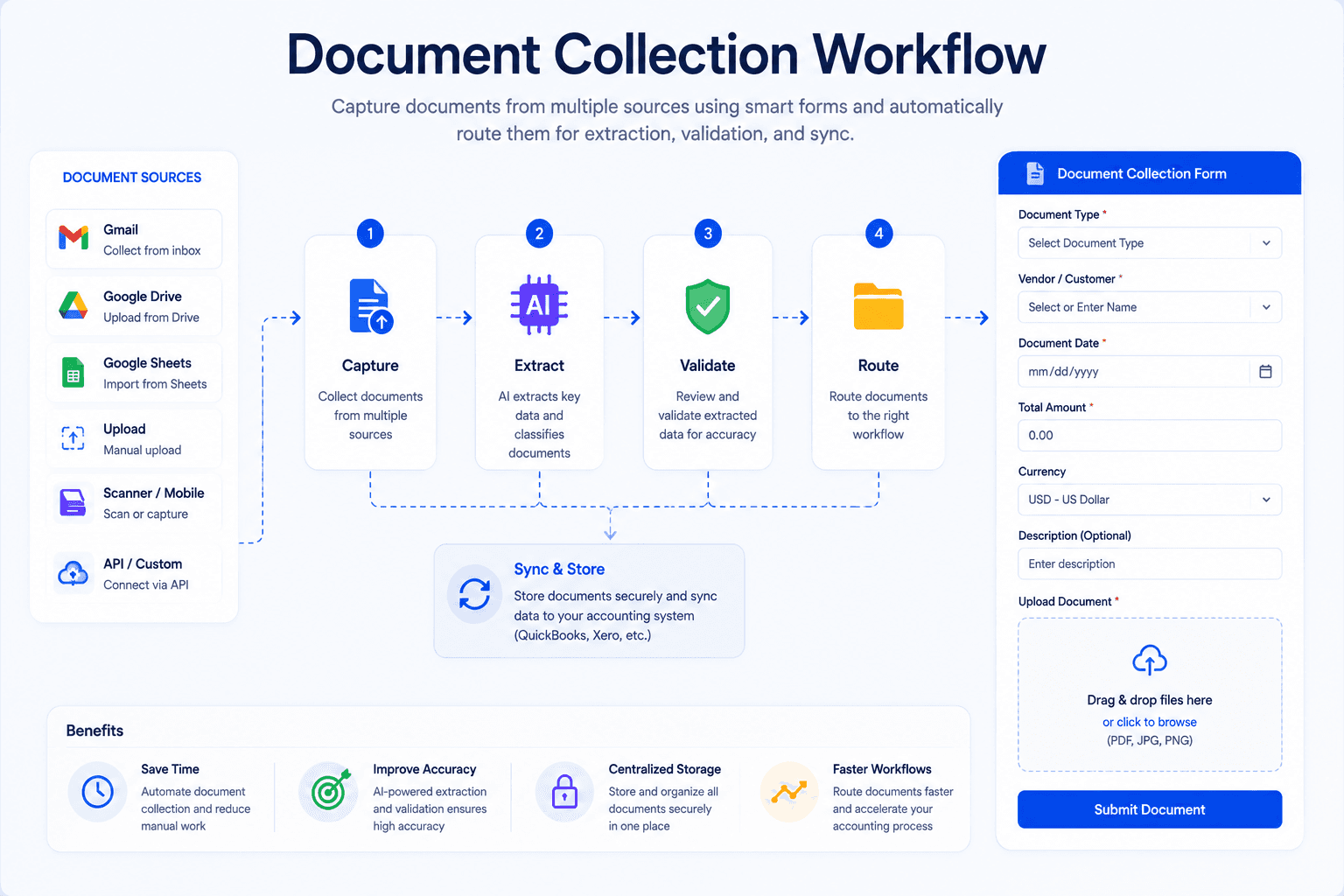
Invoice OCR (Optical Character Recognition) software converts invoice images and PDFs into structured accounting data.
The process typically includes:
Document Capture
Invoices arrive through:
- Upload portals
- Cloud storage
- Mobile devices
- Scanners
OCR Processing
The software identifies text and invoice fields.
Data Extraction
Important information is extracted automatically.
Examples include:
- Invoice number
- Vendor name
- Due date
- Tax amount
- Total amount
Validation
Business rules verify extracted information.
Accounting Sync
Validated data is pushed into QuickBooks.
Modern invoice OCR systems use machine learning and AI to improve accuracy across different invoice formats.
Features to Look for in Invoice Scanning Software
Not all invoice scanners are created equal.
Here are the most important features to evaluate.
Line-Item Extraction
The best tools extract:
- Product descriptions
- Quantities
- Unit prices
- Taxes
- Extended totals
This is especially important for inventory and purchase order workflows.
Multi-Page Invoice Support
Many vendor invoices span multiple pages.
Your software should process entire invoice packages accurately.
Batch Processing
Finance teams often process hundreds of invoices at once.
Batch uploads significantly improve productivity.
Duplicate Detection
Duplicate invoices can lead to overpayments.
Strong validation rules help prevent costly mistakes.
QuickBooks Integration
Direct synchronization eliminates manual imports.
Approval Workflows
Invoice routing and approvals streamline accounts payable operations.
Mobile Capture
Useful for field teams and remote employees.
Best Invoice Scanning Software for QuickBooks
Below are some of the most widely used invoice scanning solutions.
| Software | Best For | QuickBooks Integration |
|---|---|---|
| BillsDeck | Invoice Collection + Extraction | Direct Workflow Integration |
| Dext | Accounting Firms | Direct Sync |
| AutoEntry | Multi-Platform Accounting | Direct Sync |
| BillBjorn | QuickBooks Native Users | Direct Sync |
| Scan2Invoice | Paper Invoice Processing | Direct Sync |
| EzzyBills | PO Matching | Direct Sync |
| DocuClipper | PDF Invoice Processing | Direct Sync |
| DOKKA | Email Invoice Capture | Direct Sync |
| Nanonets | AI Document Processing | API Integration |
| Invoice Data Extraction | Flexible Extraction Workflows | CSV/Excel Export |
Detailed Software Reviews
1. BillsDeck
BillsDeck is designed for businesses that want more than simple invoice scanning.
Instead of only extracting invoice data, BillsDeck provides a complete workflow for:
- Invoice collection
- Invoice OCR
- Receipt scanning
- Purchase order processing
- Vendor document management
- Accounting integrations
Key Features
- AI-powered invoice extraction
- Email invoice collection
- Receipt scanning
- QuickBooks integration
- Xero integration
- Google Sheets integration
- Vendor workflow automation
- Document organization
Businesses looking specifically for QuickBooks invoice and receipt automation can also use the BillsDeck Receipt Scanner for QuickBooks.
Best For
- Accounting firms
- Bookkeepers
- SMB finance teams
- AP automation workflows
2. Dext
Dext remains one of the most popular invoice capture solutions for accountants.
Strengths
- Strong OCR accuracy
- Multi-client management
- QuickBooks synchronization
- Expense management
Limitations
- Higher pricing
- More accounting-focused than operations-focused
3. AutoEntry
AutoEntry uses a credit-based pricing model.
Strengths
- Flexible pricing
- Multiple accounting integrations
- Good invoice extraction
Limitations
- Credit consumption can become difficult to predict
4. BillBjorn
BillBjorn focuses heavily on QuickBooks users.
Strengths
- QuickBooks-first design
- Easy onboarding
- Direct bill creation
Limitations
- Limited ecosystem outside QuickBooks
5. Scan2Invoice
Ideal for organizations still receiving paper invoices.
Strengths
- Scanner support
- QuickBooks connectivity
- Reliable invoice capture
Limitations
- Less optimized for digital-first workflows
6. EzzyBills
Strong purchase-order matching functionality.
Strengths
- Invoice matching
- AP automation
- Vendor reconciliation
Limitations
- Steeper learning curve
7. DocuClipper
Specializes in PDF conversion and financial document extraction.
Strengths
- PDF processing
- Structured exports
- Accounting integrations
Limitations
- Primarily PDF-focused
8. DOKKA
Built around email invoice automation.
Strengths
- Automatic inbox monitoring
- Vendor invoice capture
- Workflow automation
Limitations
- Email-centric workflows only
9. Nanonets
An AI-powered Intelligent Document Processing platform.
Strengths
- Flexible AI extraction
- Workflow customization
- Enterprise capabilities
Limitations
- Requires setup and training
10. Invoice Data Extraction
Provides configurable extraction workflows.
Strengths
- Flexible output formats
- Batch processing
- AI-assisted extraction
Limitations
- No direct QuickBooks synchronization
How to Choose the Right Solution
Different businesses have different requirements.
Small Businesses
Focus on:
- Ease of use
- QuickBooks integration
- Affordable pricing
Accounting Firms
Look for:
- Multi-client support
- Batch processing
- Document organization
Enterprises
Evaluate:
- Workflow automation
- Approval routing
- Compliance controls
- ERP integrations
High Invoice Volume Organizations
Prioritize:
- Batch processing
- Line-item extraction
- Automation capabilities
Invoice Scanning Best Practices
Standardize Invoice Intake
Use dedicated inboxes or upload portals.
Consistent document collection improves OCR accuracy.
Automate Vendor Classification
Create vendor rules wherever possible.
Validate Before Posting
Even highly accurate OCR systems should include review workflows.
Use Duplicate Checks
Prevent duplicate payments.
Store Source Documents
Maintain a complete audit trail.
Industry practitioners consistently report that validation workflows are often more important than OCR accuracy alone.
How BillsDeck Automates Invoice Processing
Many businesses focus only on OCR.
The bigger challenge is often collecting invoices in the first place.
Invoices may arrive through:
- Gmail
- Outlook
- Vendor portals
- Shared drives
- Employee uploads
BillsDeck solves both problems.
Document Collection
Automatically collect invoices from multiple channels.
Invoice OCR
Extract structured invoice data using AI-powered OCR.
Receipt Automation
Scan and process receipts directly into accounting workflows through the BillsDeck Receipt Scanner for QuickBooks.
Accounting Integrations
Connect with:
- QuickBooks
- Xero
- Google Sheets
Workflow Automation
Reduce manual bookkeeping effort and improve processing speed.
Rather than simply scanning invoices, BillsDeck helps automate the entire invoice lifecycle from collection to accounting entry.
Frequently Asked Questions
What is invoice scanning software?
Invoice scanning software uses OCR and AI technologies to extract information from invoices and convert it into structured accounting data.
Does QuickBooks have invoice scanning?
QuickBooks offers Receipt Capture functionality, but dedicated invoice scanning software provides significantly more advanced invoice processing capabilities.
What information can invoice OCR extract?
Most solutions extract:
- Vendor names
- Invoice numbers
- Dates
- Due dates
- Taxes
- Totals
- Line items
- Payment terms
What is the difference between receipt scanning and invoice scanning?
Receipt scanning focuses on expense receipts, while invoice scanning captures detailed accounts payable information such as line items, due dates, taxes, and vendor data.
Is invoice OCR accurate?
Modern AI-powered OCR systems can achieve very high accuracy rates, especially when combined with validation workflows and business rules.
Which invoice scanner works best with QuickBooks?
The best solution depends on your workflow, invoice volume, and automation requirements. Businesses looking for invoice collection, OCR extraction, and accounting automation in one platform should evaluate BillsDeck alongside other leading solutions.
Can BillsDeck scan invoices and receipts for QuickBooks?
Yes. BillsDeck supports invoice OCR, receipt scanning, document collection, and integrations with QuickBooks and other accounting platforms.
Final Thoughts
QuickBooks remains one of the most powerful accounting systems available to small and mid-sized businesses, but manual invoice entry continues to be a major operational challenge.
Invoice scanning software bridges the gap by automatically extracting invoice data and sending it into accounting workflows.
The right solution can:
- Reduce manual data entry
- Improve accuracy
- Accelerate accounts payable processes
- Eliminate repetitive bookkeeping tasks
- Improve visibility across finance operations
Whether you're a bookkeeper processing 50 invoices per month or an AP team handling thousands, investing in invoice scanning software can significantly improve productivity.
If you're looking for a solution that combines document collection, invoice OCR, receipt scanning, and accounting automation in one platform, BillsDeck provides a streamlined approach to modern invoice processing.