Businesses process thousands of documents every day. Invoices arrive as PDFs, receipts come as images, contracts are scanned into OCR files, and spreadsheets are buried inside ZIP archives. Manually extracting information from these files takes time, introduces errors, and slows down operations.
Search demand for terms like “extract text from image,” “extract data from PDF to Excel,” “how to extract pages from PDF,” and “OCR document extraction” continues to grow because teams want faster ways to process information.
Modern AI-powered extraction platforms such as BillsDeck make it possible to automatically extract structured data from:
- PDFs
- Scanned invoices
- Receipts
- Images
- Bank statements
- ZIP archives
- OCR documents
- Shipping documents
- Purchase orders
- Excel attachments
This guide explains how document extraction works, common extraction use cases, methods for extracting data from different file formats, and how businesses use BillsDeck to automate document workflows.
Intelligent Document Processing vs Traditional OCR
For years, businesses relied on traditional OCR to convert scanned documents into text. OCR reads characters from an image—that is all. It does not understand that a number on an invoice is a total amount, that a table row represents a line item, or that a date field should map to a due-date column in your ERP.
Intelligent document processing (IDP) solves this limitation. IDP combines OCR with machine learning, layout analysis, natural language understanding, and workflow automation to extract structured, validated data from unstructured documents.
What Traditional OCR Does
Traditional OCR workflows:
- Scan or upload a document
- Convert image text to plain characters
- Export raw text (often with broken formatting)
- Require a human to copy values into spreadsheets or software
This works for simple use cases—digitizing a letter or searching a PDF—but fails for business documents with tables, key-value pairs, and multi-page layouts.
What Intelligent Document Processing Adds
IDP platforms like BillsDeck add layers that traditional OCR lacks:
| Layer | Traditional OCR | Intelligent Document Processing |
|---|---|---|
| Text recognition | Character-level | Character + layout-aware |
| Field mapping | Manual | Automatic (invoice #, vendor, total) |
| Table extraction | Broken or missing | Structured rows and columns |
| Validation | None | Business rules and confidence scoring |
| Workflow | Export text file | API, ERP sync, approval queues |
| Learning | Static engine | Improves from corrections |
Practical IDP Use Cases
IDP applies across the document types covered in this guide:
- Invoices — Extract vendor, line items, tax, and due dates; export via the invoice to JSON tool
- PDFs with tables — Parse financial tables with the PDF table extractor
- Complex PDF layouts — Use an AI PDF parser for multi-column and multi-page documents
- Receipts and statements — Normalize fields and sync to accounting systems automatically
Why Finance Teams Are Moving to IDP
Accounting, AP, and bookkeeping teams process documents where accuracy matters more than raw text. A mistyped invoice total or miscategorized receipt creates reconciliation problems that take hours to fix. IDP reduces those errors by validating extracted fields before they reach your system of record.
If you are evaluating extraction tools, start with the foundational guide: What is intelligent document processing?. It explains how IDP fits into modern finance automation stacks and when it outperforms template-based or manual extraction.
IDP is not a replacement for OCR—it is OCR plus the intelligence required to turn documents into actionable business data.
Table of Contents
- What Is Document Data Extraction?
- How OCR Extraction Works
- Types of Files You Can Extract Data From
- How to Extract Text from Images
- How to Extract Text from PDFs
- How to Extract Tables from PDFs to Excel
- How to Extract Images from PDFs
- How to Extract Pages from PDFs
- How to Extract ZIP and RAR Files
- How AI Extraction Improves Accuracy
- Invoice and Receipt Data Extraction
- Bank Statement Extraction
- Logistics and Shipping Document Extraction
- Excel Data Extraction Workflows
- How Businesses Use BillsDeck
- OCR Challenges and Solutions
- Manual Extraction vs AI Extraction
- Best Practices for OCR Document Processing
- Future of AI Document Extraction
- Frequently Asked Questions
What Is Document Data Extraction?
Document data extraction is the process of pulling useful information from files and converting it into structured, usable data.
The extracted data may include:
| Document Type | Extracted Fields |
|---|---|
| Invoice | Invoice number, vendor, amount, GST, due date |
| Receipt | Merchant, total, tax, date |
| Bank Statement | Transactions, balances, account numbers |
| Contract | Clauses, signatures, renewal dates |
| Shipping Label | Tracking number, carrier, address |
| Purchase Order | PO number, line items, quantities |
| Image | Text, tables, handwriting |
| Text, tables, pages, metadata |
Traditional extraction methods relied on templates and manual entry. AI extraction tools now use OCR and machine learning to identify fields automatically.
How OCR Extraction Works
OCR stands for Optical Character Recognition.
OCR converts scanned images and PDFs into machine-readable text.
OCR Workflow
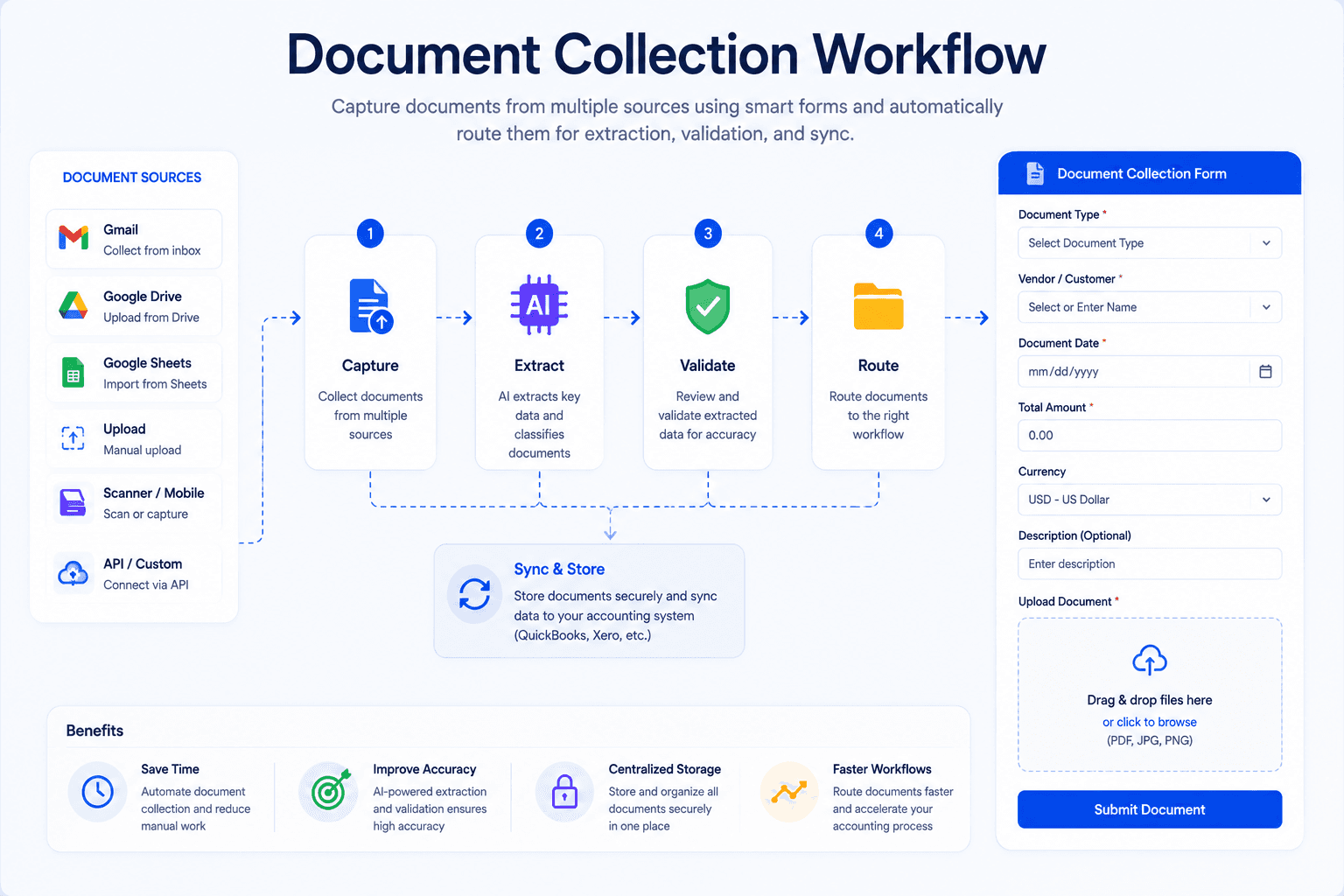
- Upload document
- Detect text regions
- Convert image text into characters
- Identify document structure
- Extract fields
- Export structured output
Modern AI OCR systems go beyond text recognition by understanding layouts, tables, and relationships between fields.
Example
A scanned invoice image may contain:
- Vendor name
- Invoice date
- Tax amount
- Total amount
- Line items
BillsDeck automatically identifies these fields and converts them into structured JSON, Excel, or API output.
Types of Files You Can Extract Data From
Businesses work with multiple file formats every day.
Common Supported Formats
| File Format | Extraction Use Case |
|---|---|
| Invoices, contracts, bank statements | |
| JPG / PNG | Receipts, scanned documents |
| TIFF | High-resolution OCR scans |
| ZIP | Bulk document uploads |
| RAR | Archived business records |
| DOCX | Contracts and agreements |
| XLSX | Spreadsheet imports |
| CSV | Data processing |
| Email Attachments | Automated workflows |
How to Extract Text from Images
One of the fastest-growing search queries is “extract text from image.”
Images often contain important information:
- Receipts
- Business cards
- IDs
- Shipping labels
- Medical forms
- Handwritten notes
Manual Extraction Method
Traditional methods involve:
- Opening the image
- Typing content manually
- Copying into Excel or software
This process is slow and error-prone.
AI OCR Extraction Method
With BillsDeck:
- Upload image
- AI detects text
- Structured data is extracted automatically
- Export to JSON, CSV, or Excel
Example Use Cases
| Industry | Image Extraction Use Case |
|---|---|
| Finance | Receipt OCR |
| Logistics | Shipping labels |
| Healthcare | Patient forms |
| Retail | Purchase receipts |
| Insurance | Claim documents |
How to Extract Text from PDFs
PDF extraction is one of the most common business automation tasks.
Organizations receive PDFs containing:
- Invoices
- Purchase orders
- Tax forms
- Contracts
- Statements
Challenges with PDF Extraction
Not all PDFs are the same.
| PDF Type | Difficulty |
|---|---|
| Digital PDFs | Easy |
| Scanned PDFs | Medium |
| Low-quality scans | Hard |
| Multi-column layouts | Complex |
Traditional PDF Extraction
Older tools extract raw text but lose formatting and tables.
Example problems:
- Broken columns
- Incorrect line order
- Missing values
- Table misalignment
AI-Powered PDF Extraction
BillsDeck uses OCR and layout-aware AI to:
- Detect tables
- Identify key-value pairs
- Extract invoice fields
- Process multi-page documents
- Handle rotated scans
Output Formats
- JSON
- Excel
- CSV
- API response
- ERP integrations
How to Extract Tables from PDFs to Excel
“Extract data from PDF to Excel” continues to grow because finance teams rely heavily on spreadsheets.
Common Use Cases
- Invoice line items
- Bank transactions
- Expense reports
- Purchase orders
Manual Process Problems
Copy-pasting tables from PDFs into Excel causes:
- Broken formatting
- Missing columns
- Merged cells
- Data inconsistencies
AI Table Extraction Workflow
BillsDeck automatically:
- Detects tables
- Reads rows and columns
- Maps fields
- Exports structured Excel files
Example
| PDF Field | Excel Output |
|---|---|
| Invoice Number | Column A |
| Date | Column B |
| Amount | Column C |
| Tax | Column D |
How to Extract Images from PDFs
Many PDFs contain embedded images such as:
- Product photos
- Signatures
- Scanned receipts
- Charts
- Logos
Methods to Extract Images
Manual Method
- Open PDF editor
- Save images individually
Automated AI Method
BillsDeck can:
- Detect embedded images
- Separate image regions
- Extract image metadata
- Process scanned pages
This is useful for:
- Signature extraction
- Image classification
- OCR workflows
How to Extract Pages from PDFs
Businesses often receive large PDF files containing multiple documents.
Common Requirements
- Extract invoice pages
- Separate contracts
- Split statements
- Remove irrelevant pages
AI Page Detection
BillsDeck identifies document boundaries automatically.
Example:
A 200-page PDF may contain:
- 50 invoices
- 20 receipts
- 10 statements
The platform can split them into individual documents automatically.
How to Extract ZIP and RAR Files
Searches like “how to extract ZIP file” and “how to extract RAR file” remain common because businesses often receive compressed archives.
Why Companies Use ZIP Archives
ZIP files help bundle:
- Bulk invoices
- Monthly reports
- Scanned records
- Data exports
Problems with Manual Extraction
Manual extraction involves:
- Download ZIP
- Unzip locally
- Upload each file individually
- Process documents
Automated ZIP Processing with BillsDeck
BillsDeck supports:
- Bulk ZIP uploads
- Nested folder extraction
- Multi-document OCR
- Batch invoice extraction
Supported Archive Types
| Format | Supported |
|---|---|
| ZIP | Yes |
| RAR | Yes |
| 7z | Yes |
| TAR.GZ | Yes |
How AI Extraction Improves Accuracy
Traditional OCR tools only read text.
AI extraction systems understand context.
Example
A standard OCR tool may read:
INV-2026-145
But AI understands this is:
Invoice Number
AI Extraction Benefits
| Feature | Traditional OCR | AI OCR | |---|---| | Text recognition | Yes | Yes | | Table extraction | Limited | Advanced | | Field mapping | No | Yes | | Layout understanding | No | Yes | | Multi-language support | Partial | Advanced | | Error correction | No | Yes |
Invoice and Receipt Data Extraction
Invoices are among the most automated document workflows today.
Common Invoice Fields
- Invoice number
- Vendor
- GST number
- Due date
- Currency
- Line items
- Tax amounts
Receipt OCR
BillsDeck extracts:
- Merchant name
- Purchase total
- Taxes
- Payment method
- Date and time
Industries Using Invoice OCR
| Industry | Use Case |
|---|---|
| Accounting | AP automation |
| Retail | Expense tracking |
| Logistics | Freight invoices |
| Healthcare | Claims processing |
| Construction | Vendor billing |
Bank Statement Extraction
Bank statements contain complex transaction tables.
Common Challenges
- Multi-page layouts
- Different bank formats
- Mixed debit/credit structures
- Rotated scans
AI Statement Extraction
BillsDeck extracts:
- Transaction dates
- Descriptions
- Debit amounts
- Credit amounts
- Running balances
Output Example
| Date | Description | Amount |
|---|---|---|
| 2026-05-10 | Vendor Payment | -5000 |
| 2026-05-11 | Customer Deposit | 12000 |
Logistics and Shipping Document Extraction
Shipping operations depend heavily on document processing.
Common Logistics Documents
- Bills of lading
- Packing lists
- Delivery notes
- Shipping labels
- Customs forms
AI Extraction Benefits
BillsDeck helps logistics companies:
- Capture tracking numbers
- Extract shipment dates
- Validate addresses
- Process carrier invoices
Excel Data Extraction Workflows
Many teams use Excel after extraction.
Common Excel Automation Tasks
- Extract month from date
- Extract year from date
- Extract numbers from text
- Normalize invoice tables
Example Formula Workflows
| Task | Excel Example |
|---|---|
| Extract Month | =MONTH(A1) |
| Extract Year | =YEAR(A1) |
| Extract Text | =LEFT(A1,5) |
| Extract Numbers | TEXTJOIN() workflows |
BillsDeck reduces manual spreadsheet work by delivering structured data directly into Excel-ready formats.
How Businesses Use BillsDeck
BillsDeck is designed for AI-powered document extraction and workflow automation.
Core Features
- OCR document processing
- PDF extraction
- Invoice data capture
- Receipt OCR
- Bank statement parsing
- AI table extraction
- API integrations
- Bulk document processing
Example Workflow
- Upload ZIP archive
- BillsDeck extracts files
- OCR processes documents
- AI identifies fields
- Data exported to ERP or Excel
Teams Using BillsDeck
| Team | Workflow |
|---|---|
| Finance | AP automation |
| Operations | Shipment tracking |
| Procurement | PO extraction |
| HR | Employee document processing |
| Healthcare | Medical records |
OCR Challenges and Solutions
Even advanced OCR systems face challenges.
Common OCR Problems
| Challenge | Solution |
|---|---|
| Blurry scans | AI image enhancement |
| Handwriting | Handwriting OCR |
| Low contrast | Adaptive preprocessing |
| Rotated documents | Auto-rotation |
| Multiple languages | Multilingual OCR |
BillsDeck includes preprocessing pipelines to improve extraction accuracy before OCR runs.
Manual Extraction vs AI Extraction
| Feature | Manual Processing | AI Extraction | |---|---| | Speed | Slow | Fast | | Accuracy | Human error | High accuracy | | Scalability | Limited | High | | Cost | Expensive | Lower long-term | | Automation | None | End-to-end | | Bulk Processing | Difficult | Easy |
Best Practices for OCR Document Processing
1. Use High-Quality Scans
Better image quality improves OCR accuracy.
2. Standardize Upload Formats
Consistent formats simplify extraction.
3. Validate Extracted Fields
Use validation rules for:
- Dates
- Currency
- Tax IDs
4. Automate Workflows
Connect extraction tools to:
- ERP systems
- Accounting software
- CRMs
- Databases
5. Use AI Layout Detection
Advanced layout understanding improves table extraction accuracy.
Future of AI Document Extraction
The document AI market continues growing rapidly.
Future capabilities include:
- Real-time OCR APIs
- Multimodal extraction
- Voice-to-document workflows
- AI agents for document processing
- Fully autonomous back-office automation
Businesses moving away from manual data entry gain:
- Faster operations
- Lower costs
- Better compliance
- Reduced errors
Why Businesses Are Moving to AI Extraction Platforms
Companies no longer want teams spending hours copying data from PDFs into spreadsheets.
Modern AI extraction platforms provide:
- Faster onboarding
- Automated workflows
- Searchable structured data
- Real-time integrations
- API-first architecture
BillsDeck helps businesses centralize document extraction and automate data workflows across departments.
Example BillsDeck Extraction Use Cases
Invoice Automation
Extract:
- Invoice IDs
- Vendor names
- Tax values
- Due dates
Receipt Processing
Capture:
- Expense totals
- Merchant names
- Purchase categories
Contract OCR
Extract:
- Parties
- Renewal dates
- Clauses
- Signatures
Shipping Documents
Capture:
- Tracking numbers
- Shipment dates
- Delivery status
Bank Statements
Parse:
- Transactions
- Balances
- Account summaries
Choosing the Right OCR Extraction Platform
When evaluating extraction software, look for:
| Feature | Importance |
|---|---|
| OCR Accuracy | Critical |
| Table Extraction | High |
| API Access | High |
| Bulk Uploads | Important |
| Multi-language OCR | Important |
| Workflow Automation | Critical |
| Export Formats | Important |
BillsDeck combines OCR, AI extraction, workflow automation, and structured exports into a single platform.
Frequently Asked Questions
What is OCR document extraction?
OCR document extraction converts scanned images and PDFs into machine-readable text and structured data.
How do I extract text from an image?
You can use OCR tools like BillsDeck to upload images and automatically convert text into editable formats.
Can AI extract tables from PDFs?
Yes. AI-powered extraction tools can identify rows, columns, and structured table data from PDFs.
How do I extract data from PDF to Excel?
Upload the PDF into an extraction platform like BillsDeck, which converts tables and fields into Excel-ready structured data.
Can OCR read handwritten text?
Modern AI OCR systems can recognize many handwriting styles, though accuracy depends on scan quality.
What file formats does BillsDeck support?
BillsDeck supports PDFs, images, ZIP files, RAR files, Excel sheets, scanned documents, and OCR-based workflows.
Is OCR accurate for invoices?
AI-powered invoice OCR is highly accurate when combined with layout analysis and field validation.
Can I process multiple documents at once?
Yes. BillsDeck supports bulk uploads and ZIP archive extraction for batch processing workflows.
Final Thoughts
Document extraction is becoming a core part of modern business operations. From invoices and receipts to PDFs and OCR scans, companies need faster ways to convert unstructured documents into usable data.
AI-powered extraction platforms such as BillsDeck help automate repetitive workflows, improve accuracy, and reduce manual processing time.
Whether you need to:
- Extract text from images
- Convert PDFs to Excel
- Process invoices automatically
- Parse bank statements
- Handle ZIP archives
- Automate OCR workflows
AI document extraction tools can dramatically improve operational efficiency and scalability.
If your team still relies on manual copy-paste workflows, now is the time to move toward automated extraction and intelligent document processing.
Related IDP Resources
Explore more guides on intelligent document processing and finance automation:
- What is intelligent document processing? — Core concepts and business applications
- Invoice processing automation guide — AP workflow automation with document AI
- How to convert bank statement PDF to CSV — Bank statement IDP extraction
- Docsumo vs Nanonets vs BillsDeck — Document AI platform comparison
- How to automate receipt capture in QuickBooks Online — Receipt automation for QuickBooks
- Best OCR receipt scanner software 2026 — Receipt OCR platform roundup