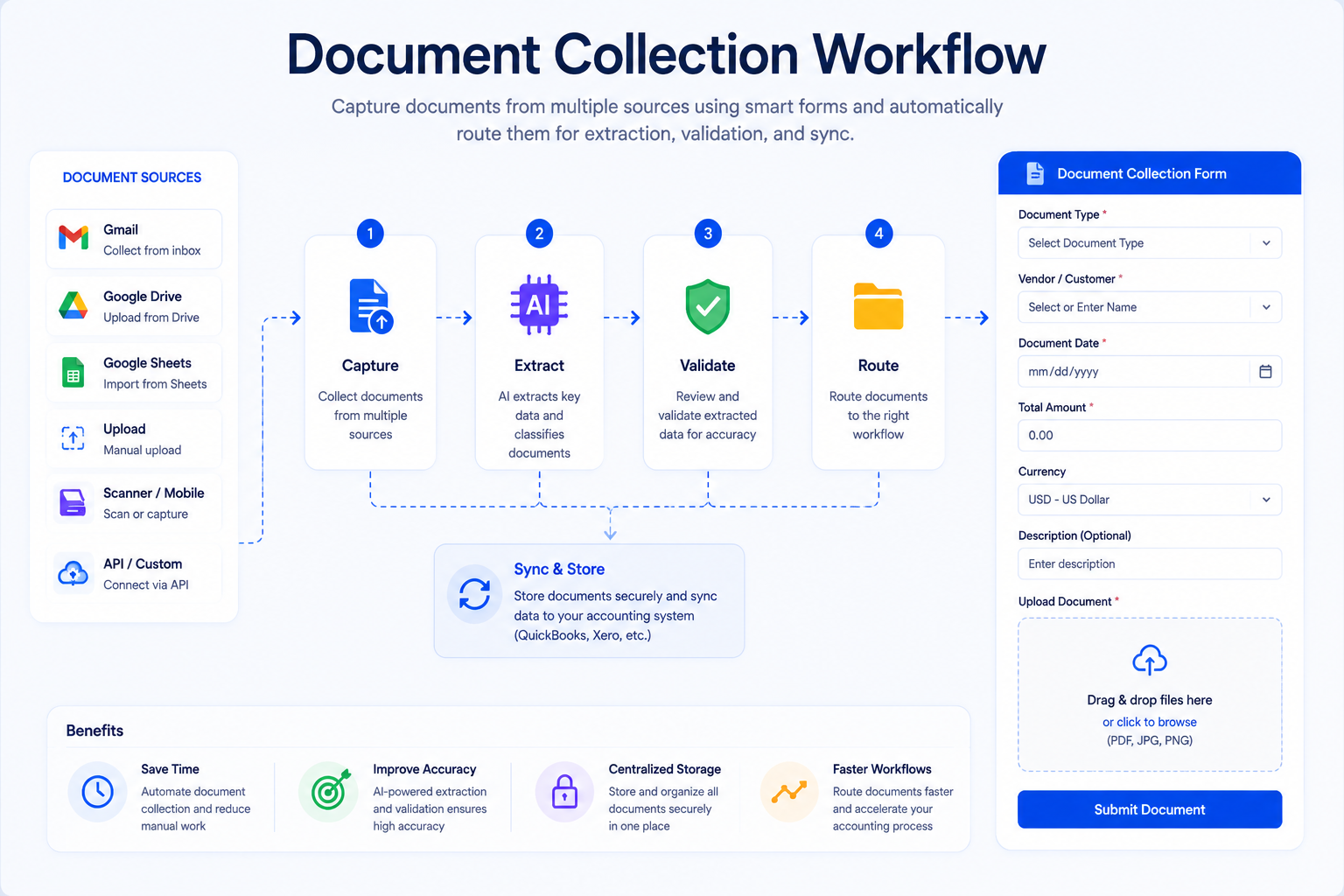
Organizations collect thousands of documents every year from customers, vendors, employees, suppliers, and business partners. Tax forms, invoices, contracts, purchase orders, receipts, identity documents, bank statements, compliance records, and onboarding paperwork all need to be gathered, reviewed, organized, and stored.
For many businesses, document collection remains one of the most time-consuming operational tasks. Employees spend hours sending emails, following up with clients, checking missing files, organizing folders, and manually tracking submission status.
Modern document collection software solves these challenges by creating structured workflows that allow businesses to request, receive, track, review, and manage documents securely in one place. Platforms like BillsDeck Document Collection combine secure upload links, template-based OCR extraction, cross-document matching, approvals, and optional sync to QuickBooks, Xero, or Zoho Books — so teams stop chasing email attachments and start processing structured data.
This guide explains everything you need to know about document collection, including how it works, common challenges, best practices, use cases, and how automation can transform your document gathering process.
Table of Contents
- What Is Document Collection?
- Why Document Collection Matters
- How Traditional Document Collection Works
- Common Challenges Businesses Face
- How Modern Document Collection Software Works
- Core Features of Document Collection Platforms
- Benefits of Automated Document Collection
- Industries That Depend on Document Collection
- Types of Documents Commonly Collected
- Best Practices for Document Collection
- Security Considerations
- Document Collection vs Document Management
- Document Collection Workflow Example
- How BillsDeck Simplifies Document Collection
- Future of Document Collection
- Frequently Asked Questions
- Final Thoughts
What Is Document Collection?
Document collection is the process of requesting, gathering, receiving, organizing, tracking, and managing documents from individuals or organizations.
The process typically involves:
- Identifying required documents
- Sending requests
- Receiving uploads
- Verifying submissions
- Following up on missing documents
- Organizing files
- Storing records securely
Modern document collection platforms provide structured workflows that allow organizations to automate much of this process through secure upload portals, checklists, notifications, reminders, and tracking dashboards.
In simple terms, document collection ensures that businesses receive the right documents from the right people at the right time.
Why Document Collection Matters
Every business process relies on documentation.
Without proper document collection:
- Client onboarding gets delayed
- Compliance requirements are missed
- Accounting processes slow down
- Loan approvals take longer
- Audits become difficult
- Customer experience suffers
A missing document can halt an entire workflow.
For example:
| Business Process | Required Documents |
|---|---|
| Client Onboarding | ID proof, contracts, applications |
| Accounting | Bills, invoices, receipts |
| Lending | Bank statements, tax returns |
| HR Hiring | Identity proof, certifications |
| Insurance Claims | Claim forms, supporting evidence |
| Legal Cases | Contracts, records, supporting documents |
Efficient document collection directly impacts operational speed and customer satisfaction.
How Traditional Document Collection Works
Historically, businesses collected documents through:
- Email attachments
- Physical paperwork
- Shared drives
- Fax submissions
- Postal mail
A typical workflow looked like this:
- Send email request
- Wait for response
- Follow up manually
- Receive incorrect files
- Request replacements
- Organize folders manually
- Track status in spreadsheets
This approach creates significant inefficiencies.
Problems often include:
- Lost emails
- Missing attachments
- Version confusion
- Security concerns
- Long turnaround times
- Poor visibility
As document volumes increase, manual methods become increasingly difficult to manage.
Common Challenges Businesses Face
1. Missing Documents
Clients frequently forget to upload required files.
Without a structured checklist, businesses must repeatedly follow up.
2. Endless Email Chains
Documents often arrive across multiple emails over several days or weeks.
Tracking progress becomes difficult.
3. Lack of Visibility
Teams cannot easily determine:
- Who submitted documents
- Which files are missing
- What needs review
- Current status
4. Security Risks
Email attachments are not designed for sensitive document exchange.
Businesses handling financial, legal, healthcare, or personal information require stronger security controls. Secure document collection platforms use encryption, access controls, and protected upload environments to reduce risk.
5. Manual Follow-Ups
Employees spend hours sending reminder emails.
This administrative burden grows significantly as client volume increases.
How Modern Document Collection Software Works
Modern platforms streamline document collection through a structured workflow. With BillsDeck document collection workflows, the process typically looks like this:
Step 1: Create a Collection Workflow
Define a workflow name, destination folder, and each document to collect — up to 10 per workflow. Assign a published extraction template to each document so uploads are OCR-processed automatically. Restrict access to allowed team members and optionally create a subfolder for every submission.
Step 2: Share a Secure Collection Link
Generate one reusable collection link instead of sending ad-hoc email requests. Submitters upload required documents through a guided interface — receipts, invoices, bank statements, contracts, or any template-supported document type.
Step 3: Extract and Match Data
BillsDeck extracts structured fields from each upload. When matching is enabled, field values are compared across all documents in the same submission — for example, vendor name and amount — so finance teams can spot mismatches before approval.
Step 4: Review and Approve
Submissions can require approval before files are finalized in your folder. Review extracted data, fix mismatches with reupload or manual adjustment, and retry matching when needed.
Step 5: Sync to Accounting (Optional)
When sync is enabled on a workflow, approved documents can flow to QuickBooks, Xero, or Zoho Books — reducing manual re-entry from collection to bookkeeping.
Core Features of Document Collection Platforms
Workflow-Based Collection Links
Instead of one-off email requests, teams define reusable workflows with a shared link, required document list, and access controls.
Template-Based Extraction
Each collected document can use a published template so OCR runs automatically on upload — turning files into structured data, not just stored PDFs.
Cross-Document Matching
Advanced platforms compare extracted fields across documents in the same submission to catch inconsistencies before they reach accounting.
Secure Upload Portal
Users upload files through a protected portal instead of email.
This improves security and organization.
Allowed-User Access
Restrict who can open a collection link and submit documents — useful for internal finance teams, client onboarding, or vendor document requests.
Automated Reminders
Systems automatically remind users about missing documents.
This eliminates manual follow-ups.
Approval Workflows
Uploaded submissions can be reviewed and approved before documents are filed or synced downstream.
Real-Time Tracking
Businesses can monitor submission progress instantly.
Fillable Forms
Some platforms allow data collection through digital forms.
E-Signatures
Documents can be completed and signed within the same workflow.
Mobile Uploads
Many solutions support document scanning and uploads directly from smartphones.
Benefits of Automated Document Collection
Faster Turnaround Times
Clients submit documents sooner when guided by structured workflows.
Reduced Administrative Work
Automation removes repetitive tasks such as:
- Sending reminders
- Tracking status
- Organizing folders
Better Client Experience
Clients appreciate a simple upload process rather than lengthy email exchanges.
Improved Accuracy
Checklists reduce missing or incorrect documents.
Greater Visibility
Teams gain a centralized view of all submissions.
Enhanced Security
Encryption and access controls help protect sensitive information.
Industries That Depend on Document Collection
Accounting and Bookkeeping
Accountants regularly collect:
- Invoices
- Receipts
- Bills
- Tax documents
- Financial statements
Financial Services
Financial institutions gather:
- Bank statements
- Income verification
- Loan applications
- Tax returns
Legal Services
Law firms collect:
- Contracts
- Evidence
- Court records
- Identity verification
Human Resources
HR teams gather:
- Employee records
- Certifications
- Employment agreements
- Tax forms
Insurance
Insurance providers request:
- Claim documentation
- Supporting evidence
- Medical records
- Financial documents
Types of Documents Commonly Collected
Financial Documents
- Invoices
- Bills
- Purchase orders
- Bank statements
- Tax returns
Identity Documents
- Passports
- Driver's licenses
- National IDs
Legal Documents
- Contracts
- Agreements
- Licenses
Employee Documents
- Offer letters
- Certifications
- Payroll records
Compliance Documents
- KYC records
- Regulatory filings
- Audit reports
Best Practices for Document Collection
Create Clear Checklists
Specify exactly what documents are required.
Avoid vague requests.
Use Standardized Templates
Templates improve consistency across teams.
Automate Reminders
Automated notifications dramatically improve completion rates.
Make Uploading Easy
Support mobile devices and drag-and-drop uploads.
Review Quickly
Prompt review prevents delays and allows users to correct issues sooner.
Centralize Storage
Keep all collected documents in a single system.
Maintain Audit Trails
Track:
- Upload dates
- User activity
- Approval history
- Document revisions
Security Considerations
Security is one of the most important aspects of document collection.
Organizations often collect:
- Financial information
- Personal identification
- Legal records
- Sensitive business data
A secure document collection process should include:
- Encryption in transit
- Encryption at rest
- Access controls
- Authentication
- Activity logging
- Secure storage
Many modern platforms offer enterprise-grade security protections specifically designed for handling confidential documents.
Document Collection vs Document Management
Although related, these are different concepts.
| Document Collection | Document Management |
|---|---|
| Focuses on gathering documents | Focuses on storing and organizing documents |
| Starts before documents are received | Starts after documents are received |
| Includes requests and follow-ups | Includes retention and retrieval |
| Handles submissions | Handles lifecycle management |
Document collection is often the first stage of a larger document management process.
Document Collection Workflow Example
Imagine a finance team collecting monthly expense documentation from staff.
Step 1
Create a workflow named Monthly expense collection with:
- Receipt (receipt template)
- Proof of payment (invoice or bank template)
- Supporting invoice (invoice template)
Step 2
Choose a destination folder and restrict uploads to allowed finance team members.
Step 3
Share the collection link. Each submitter uploads all required documents in one submission.
Step 4
BillsDeck extracts data from each file and compares matching fields — such as vendor name and amount — across the submission.
Step 5
Finance reviews mismatches, approves complete submissions, and optionally syncs approved records to QuickBooks or Xero.
Step 6
Documents land in the correct folder — with optional subfolders per submission — ready for reporting and audit.
This entire workflow can occur without a single email attachment. See the Document Collection feature page for a full overview.
How BillsDeck Simplifies Document Collection
Businesses that handle invoices, bills, receipts, purchase orders, and financial records often need more than simple file collection.
They need a workflow that not only gathers documents but also extracts information, validates submissions, and sends data to downstream systems.
BillsDeck Document Collection helps businesses streamline document collection and financial document processing with:
- Collection workflows — define up to 10 documents per workflow with published extraction templates
- Secure collection links — one reusable link with allowed-user access control
- Template-based OCR — automatic data extraction on every upload
- Cross-document matching — compare extracted fields across documents in the same submission
- Approval on submit — review submissions before files are finalized
- Subfolders per submission — optional titled subfolders under your destination folder
- Accounting sync — optional sync to QuickBooks, Xero, or Zoho Books per workflow
- Match dashboard — view matched, mismatch, and pending counts with fix and retry actions
- Gmail, Google Drive, and Google Sheets integrations — for broader document intake beyond collection links
Instead of manually collecting files and entering data into accounting systems, businesses can automate the process from document submission through extraction, matching, approval, and bookkeeping sync.
For accounting firms, bookkeepers, finance teams, and operations departments, this can significantly reduce manual effort while improving accuracy.
Future of Document Collection
Document collection is rapidly evolving.
Modern platforms are moving beyond simple file uploads toward intelligent workflows that include:
- Automated categorization
- Data extraction
- Workflow automation
- System integrations
- Real-time collaboration
- Digital signatures
- Mobile-first experiences
Organizations increasingly expect document collection systems to connect directly with accounting, CRM, ERP, and storage platforms.
The future is not just collecting documents—it is turning documents into actionable business data.
Frequently Asked Questions
What is document collection software?
Document collection software is a platform that helps businesses securely request, receive, track, review, and manage documents from clients, employees, vendors, or partners. Common features include checklists, upload portals, reminders, and workflow tracking.
Why is document collection important?
Document collection ensures businesses receive the necessary information required to complete workflows such as onboarding, accounting, compliance, lending, and legal processes.
How can document collection be automated?
Automation can be achieved through secure portals, predefined checklists, automated reminders, workflow rules, and integrations with business systems.
Is document collection secure?
Modern document collection platforms use encryption, access controls, secure storage, and authentication mechanisms to protect sensitive information.
What industries use document collection software?
Common industries include accounting, finance, legal services, insurance, healthcare, human resources, and consulting.
What documents are commonly collected?
Organizations frequently collect invoices, receipts, contracts, tax forms, bank statements, identity documents, purchase orders, and compliance records.
Can document collection software integrate with other systems?
Yes. Many platforms integrate with cloud storage solutions, accounting software, CRM systems, and productivity tools.
How does BillsDeck help with document collection?
BillsDeck Document Collection combines secure workflow links, template-based OCR extraction, cross-document matching, approvals, and optional sync to QuickBooks, Xero, or Zoho Books — so teams automate both document gathering and financial data processing in one workflow.
Final Thoughts
Document collection is a foundational business process that impacts customer onboarding, compliance, accounting, legal operations, and countless other workflows.
While traditional methods rely heavily on email and manual follow-ups, modern document collection platforms provide structured, secure, and automated workflows that improve efficiency, reduce administrative work, and enhance the user experience.
As organizations continue to digitize operations, investing in a reliable document collection process is no longer optional. Businesses that automate document collection gain faster turnaround times, better visibility, stronger security, and more scalable operations.
Whether you're collecting invoices, onboarding clients, processing financial records, or managing compliance documentation, an automated document collection workflow can dramatically improve how your business operates.